How to choose a desk mat: size, material and colour
A buying guide for desk mats: which size fits a laptop and keyboard, which material lasts for years, how to match the colour to your desk and what to check before you order.

Measure the desk first, and what sits on it
Most people pick a mat from a photo and then find it hangs over the edge of the desk or will not take the keyboard. Take a tape measure and check two things: the depth of the desk from the front edge to the monitor, and the width you actually use, from your left hand on the keyboard to your right hand on the mouse.
A typical desk is 60 to 80 cm deep. A monitor or laptop takes about 20 cm at the back, which leaves 40 to 60 cm for the mat. That is why our large mat is 45 cm deep: it fits a shallow desk and still covers everything you touch while working.
Size: 80 × 45 cm or 25 × 25 cm?
Shops list dozens of sizes, but in practice there are two kinds. A desk mat covers the whole working area including the keyboard. A mouse pad is for the mouse alone and takes a corner of the desk.
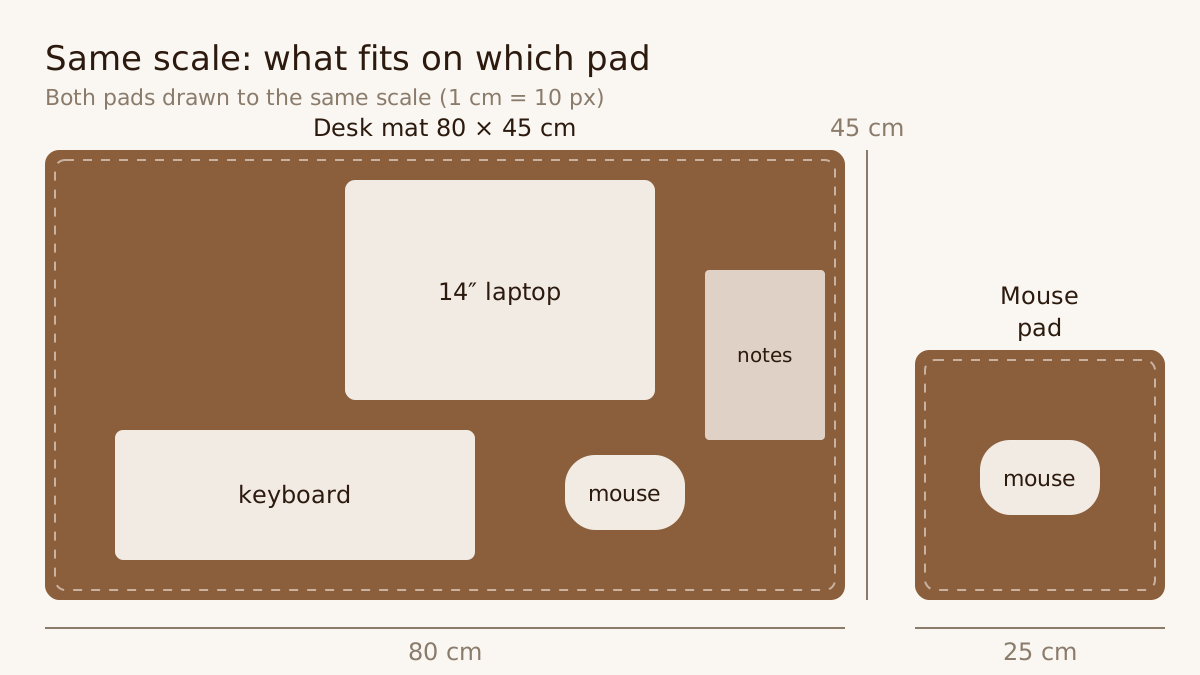
Both pads at the same scale. On 80 × 45 cm a keyboard, mouse, 14″ laptop and a notebook fit side by side; 25 × 25 cm gives a mouse room even at low sensitivity.
Choose the large mat when:
- you use a keyboard and mouse side by side and want both on the same surface,
- you work on a laptop and want it on the mat together with the mouse,
- you write by hand and want a soft surface under the paper,
- you want the desk to read as one calm surface.
Choose the small pad when:
- you have little room or move between desks,
- the keyboard sits on a tray and only the mouse is on the desk,
- you want a gift that fits in a backpack pocket.
The details of both are on the leather desk mat 80 × 45 cm and leather mouse pad 25 × 25 cm pages.
Material: what the mouse will glide on for years
Material decides how the mat feels to work on and how long it lasts. Cloth pads are cheap and fast but fray within a year and the print wears off. Rubber and plastic resist water but feel cold and go brittle. Leather offers the mouse slightly more resistance, but it is warm under the wrist, quiet, and looks better with time rather than worse. We compare them in detail in Leather, cloth or rubber mouse pad?
Watch the labels on leather. “Faux leather”, “PU leather” and “vegan leather” are polyurethane on a textile backing, a plastic that starts peeling after a year. Real full-grain leather has a natural grain with fine pores and veins; no two pieces are alike. We explain the differences in Real leather vs. faux leather.
Underside and edges
Two things you cannot see in photos but feel every day. The underside decides whether the mat stays put: suede grips wood and laminate and is gentle on the desktop, smooth plastic slides. The edges decide how long it lasts: a mat stitched around the edge holds its shape, while merely cut edges let the layers part over time.
Colour to match the desk
Choose by the desktop and what sits on it. Cognac, a warm tan, contrasts with light wood, white desks and a silver laptop, and of the three colours develops the richest patina. Dark Brown, a deep chocolate, suits walnut, oak and darker furniture and is the most discreet. Black matches a black keyboard, dark monitor and metal furniture and looks the most timeless.
If in doubt, Cognac is the most versatile: it stands out on a light desk and lifts a dark one. For ideas on tying the whole desk together, see our post on the minimalist desk setup.
Engraving: yes or no?
Initials make the mat yours and are free with us; a longer text of up to 10 characters costs €13. Pick one of six positions, most often a discreet bottom right corner. Bear in mind that an engraved mat cannot be returned, because it is made to your specification. Ideas for what to engrave are in What to engrave on a leather desk mat: 7 ideas.
Care and ageing
A leather mat needs almost nothing: a wipe with a dry or slightly damp cloth once a week and a colourless balm every few months. Keep it out of direct sun and standing water. The spots you touch most will darken and soften over time; that is patina, the mark of real leather. The full routine is in our leather care guide.
Price: what €79 and €129 buy
A cloth pad for a few euros lasts a year; a leather mat at €129 lasts for years. Per year of use, leather comes out similar or cheaper, and you do not throw it away after three years. Our prices include free shipping with Packeta across Czechia, Slovakia, Germany, Austria and Poland and dispatch within 2–3 business days; pay by card, Apple Pay or Google Pay.
A quick checklist before you order
- I have measured the desk depth and the mat fits in front of the monitor.
- I know what will sit on it: mouse only, or keyboard and laptop too.
- The material is real leather, not faux leather.
- The underside grips the desk and the edges are stitched.
- The colour matches the desktop and what sits on it.
- I have checked the initials, because an engraved mat cannot be returned.
Run through the list and the choice takes a few minutes. If you are still unsure, write to hello@deskhide.cz and we will help.
Frequently asked questions
What size desk mat should I choose?
If a keyboard, mouse and laptop sit on your desk, choose a mat around 80 × 45 cm that covers them all. If you only need a surface for the mouse or have little room, 25 × 25 cm is enough.
Is a leather desk mat suitable under a laptop?
Yes. Leather insulates the laptop from a cold desktop and protects the desk from scratches. On an 80 × 45 cm mat there is room beside the laptop for a mouse and a notebook.
How do I recognise a good desk mat?
By material and construction: full-grain leather with a natural grain, an underside that stays put on the desk, stitching around the edge, and a maker who says where and from what the mat is made.